TP-Link DS106GPP Omada Unmanaged 6-Port Gigabit Desktop Switch with 3-Port PoE+ and 1-Port PoE++

Special Order: typically 2–6 weeks
Ships directly from the manufacturer. This is an estimated lead time, not a guaranteed delivery date.
Availability can change and lead times may be longer. If your project has a deadline, check with us before ordering.
A member of our team will check with the manufacturer and personally reply by email.
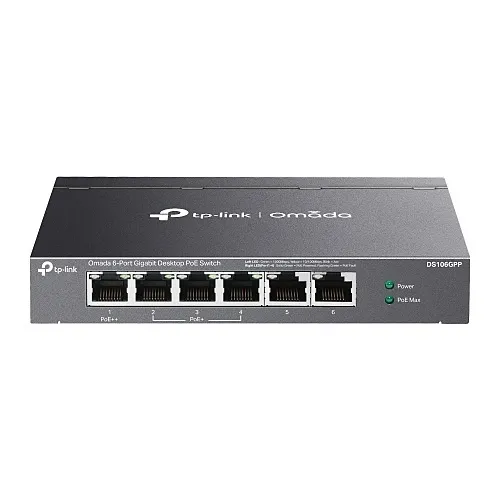
Image of 6
Key Features
- Simplify deployments by delivering data and power over a single cable: one 60W PoE++ port plus three PoE+ ports to power cameras, APs and phones
- Reliable, plug-and-play operation for fast installs in small offices and branch sites — no management overhead required
- 64W total PoE budget with PoE Auto Recovery and 802.1p/DSCP QoS to keep surveillance, VoIP and monitoring traffic stable
- Extended reach up to 250 m in Extend Mode to place devices farther from the switch without extra power infrastructure
- Compact, metal desktop design built for continuous 24/7 operation in security and networking environments
Quick Specifications
- Product Model
- DS106GPP
- Brand Name
- TP-Link
- Product Line
- Omada
- Product Name
- Omada 6-Port Gigabit Desktop Switch with 3-Port PoE+ and 1-Port PoE++
Explore the details
Product information
DS106GPP
Overview
Designed for small to medium businesses and branch installations, the TP-Link DS106GPP unmanaged 6-port Gigabit desktop switch brings reliable power and data to your edge devices with minimal effort. This Omada-series switch combines six 10/100/1000 Mbps RJ45 ports — including one PoE++ port (up to 60W) and three PoE+ ports (up to 30W each) — with a 64W total PoE budget to power IP cameras, wireless access points and VoIP phones from a single compact unit. Built-in features like 802.1p/DSCP QoS ensure latency-sensitive monitoring and security traffic gets priority, while PoE Auto Recovery keeps critical surveillance and security devices online by automatically rebooting unresponsive PDs. Extend Mode supports runs up to 250 meters for flexible device placement without additional power drops. The DS106GPP requires no configuration, making it ideal for quick rollouts in retail, office, and security surveillance environments where uptime and simplicity matter. Add the TP-Link DS106GPP to your network to consolidate power, improve installation speed, and maintain reliable monitoring — order today to upgrade your security and network edge.
Features
- Simplify deployments by delivering data and power over a single cable: one 60W PoE++ port plus three PoE+ ports to power cameras, APs and phones
- Reliable, plug-and-play operation for fast installs in small offices and branch sites — no management overhead required
- 64W total PoE budget with PoE Auto Recovery and 802.1p/DSCP QoS to keep surveillance, VoIP and monitoring traffic stable
- Extended reach up to 250 m in Extend Mode to place devices farther from the switch without extra power infrastructure
- Compact, metal desktop design built for continuous 24/7 operation in security and networking environments
| General Information | |
|---|---|
| Brand Name | TP-Link |
| Manufacturer | TP-LINK Technologies Co., Ltd |
| Product Line | Omada |
| Product Name | Omada 6-Port Gigabit Desktop Switch with 3-Port PoE+ and 1-Port PoE++ |
| Product Type | Switch |
| Product Model | DS106GPP |
| Manufacturer Part Number | DS106GPP |
| Technical Information | |
| Material | Metal |
| Power Consumption | 71.46W |
| Network Switch Type | PoE, Unmanaged |
| Media Type Supported | Twisted Pair |
| Certifications | |
| TAA Compliant | No |
| Interfaces/Ports | |
| Network (RJ-45) | Yes |
| Total Number of Network Ports | 6 |
| Management & Protocols | |
| Manageable | No |
| Media & Performance | |
| Network Technology | 10/100/1000Base-T |
| Network & Communication | |
| Layer Supported | 2 |
| Ethernet Technology | Gigabit Ethernet |
| Networking Standards | IEEE 802.3ab, IEEE 802.3af, IEEE 802.3at, IEEE 802.3i, IEEE 802.3u, IEEE 802.3x |
| Physical Characteristics | |
| Color | Black |
| Depth | 4" |
| Width | 6.2" |
| Height | 1" |
| Power Description | |
| Frequency | 50 Hz, 60 Hz |
| PoE Budget | 64W |
| Power Source | AC, PoE+, PoE++, Power Supply |
| Input Voltage | 120V AC, 230V AC |
| PoE (RJ-45) Port | Yes |
| Product Information | |
| Mount Type | Desktop Mount |
No matching specifications
Try a different term, such as a connector type or resolution.
Plan your purchase
Is this right for your project?
Confirm the model, required accessories and delivery needs before ordering.
- SKU:
- DS106GPP
- Manufacturer part:
- DS106GPP
How do I confirm compatibility?
Check the specifications and manufacturer documents for your existing system. Send us your model numbers and project requirements if you need help selecting equipment or accessories.
Ask a product specialistWhen will this item ship?
Availability is shown above. Special-order items and project quantities may need additional lead time. Contact us to confirm a delivery date before scheduling installation.
Shipping, freight and delivery detailsWhat should I know about returns?
Returns require an approved RMA. Consult the linked return policy for deadlines and eligibility. For standard non-defective returns, eligible factory-sealed items carry a 15% restocking fee and customer-paid return shipping; open-box and used items are refused. Defective and DOA claims follow the policy's separate terms. Special orders and other exclusions are final sale.
Read return eligibility and exclusionsTP-Link DS106GPP Omada Unmanaged 6-Port Gigabit Desktop Switch with 3-Port PoE+ and 1-Port PoE++
DS106GPP